

Most people hear “workflow automation” and picture a tool doing work for them while they sit back and relax. That idea sells well, but it’s only half true. Automation is not about replacing effort with ease. It’s about replacing chaos with structure. If your work is already messy, automation doesn’t fix it. It just makes the mess move faster.
That’s why some people try automation and walk away frustrated. They expected relief and got complexity instead. The real issue is not the tool. It’s the lack of a clear system behind the work. Automation only works when the process it’s built on actually makes sense.
So before you think about software, you need to understand what you’re trying to control. That’s where workflow automation begins.
Workflow Automation Starts With Structure, Not Software
At its simplest, workflow automation is using technology to handle tasks that repeat. That includes sending emails, moving data, assigning tasks, or triggering actions based on events. But that definition is surface level. It tells you what happens, not why it matters.
The deeper truth is that automation is about removing decisions that never needed to exist. Every time you stop and ask, “What do I do next?” you are paying a mental tax. Over time, that tax drains focus and slows everything down. Automation steps in and removes that friction by turning decisions into predefined actions.
But here’s where people get it wrong. They rush into tools without defining the workflow itself. They try to automate something they have never fully understood. That’s like trying to build a house without a blueprint. You might get something standing, but it won’t hold up under pressure.
The structure comes first. The tool comes second.
Understanding What a Workflow Actually Is
A workflow is simply the path a task follows from start to finish. It sounds basic, but most people have never actually mapped their workflows. They operate on memory and habit, which works fine until things scale or break.
Every workflow has four core parts: a trigger, a sequence of actions, decision points, and an outcome. The trigger starts the process. The actions move it forward. The decisions guide how it branches. The outcome is the result.
Let’s take a practical example. A customer fills out a contact form. That submission is the trigger. The system sends a confirmation email and logs the data. Those are actions. If the customer selects a specific service, the system routes the lead to a certain pipeline. That’s a decision. The final outcome is a properly categorized lead ready for follow-up.
Now imagine doing all of that manually, every single time. That’s where automation earns its place. Not by doing something magical, but by doing something predictable without fail.
Why Automation Fails More Than People Admit
There’s a quiet truth in this space that doesn’t get enough attention. Most automation projects don’t fail because the technology is weak. They fail because the thinking behind them is shallow.
People tend to automate tasks instead of systems. They pick isolated actions and try to speed them up without understanding how those actions connect. The result is a collection of automated steps that don’t work well together.
Another common issue is skipping edge cases. A workflow might work perfectly under normal conditions, but break the moment something unexpected happens. A missing field, a duplicate entry, or a delayed trigger can throw everything off. When that happens, people lose trust in the system and go back to manual work.
There’s also the problem of overbuilding. Some workflows become so complex that they are hard to maintain. One small change can cause a chain reaction of issues. What started as a time-saving system turns into something that requires constant supervision.
Automation doesn’t reward speed. It rewards clarity.
How Workflow Automation Actually Works
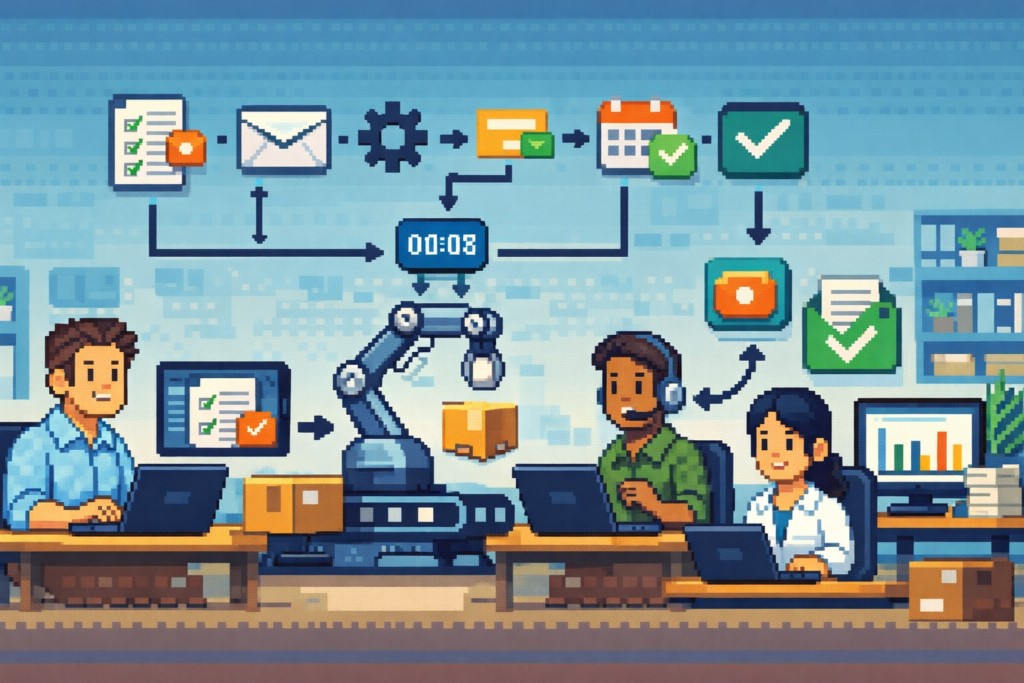
Underneath all the visual builders and sleek dashboards, automation runs on simple logic. It follows a pattern that rarely changes: when something happens, the system responds in a defined way.
This is often structured as “if this happens, then do that.” That’s the backbone of most automation tools. The trigger starts the process, conditions check for rules, and actions carry out the response.
For example, if a new lead is added, then send a welcome email. If the lead clicks a link, then tag them as engaged. If they don’t respond within three days, then send a follow-up. Each step builds on the last, creating a chain of actions that runs without manual input.
What makes this powerful is not the logic itself. It’s the consistency. The system doesn’t forget. It doesn’t get distracted. It doesn’t skip steps because it’s tired. That reliability is what turns a basic workflow into something scalable.
But that same consistency can become a problem if the logic is wrong. A flawed rule will be followed perfectly every time. That’s why careful setup matters more than fast setup.
Different Levels of Workflow Automation
Not all automation operates at the same level. Understanding this helps you avoid trying to do too much too soon.
At the simplest level, you have task automation. This handles individual actions like sending emails or updating records. It saves time, but it doesn’t change the bigger picture much.
The next level is process automation. This connects multiple steps into a complete flow. Instead of automating one action, you automate an entire sequence from start to finish. This is where real efficiency begins to show.
Then there is integration automation. This connects different tools so they work together. Data moves between systems without manual input, which reduces errors and speeds up operations.
Finally, you have decision automation. This allows systems to make choices based on rules or data. For example, routing a support request based on urgency or assigning leads based on behavior.
Each level builds on the last. Skipping ahead too quickly often leads to confusion and broken systems.

The Real Value of Automation
Saving time is the obvious benefit, but it’s not the most important one. The deeper value lies in consistency, clarity, and capacity.
Consistency means every process runs the same way every time. That reduces mistakes and creates a more reliable experience. Customers notice that, even if they can’t explain why.
Clarity comes from seeing your workflows laid out in a structured way. When you can see the system, you can improve it. You can spot bottlenecks, remove unnecessary steps, and refine how things flow.
Capacity is where things really shift. When repetitive work is handled automatically, you free up time and mental energy. That space can be used for thinking, planning, and creating. The kind of work that actually moves things forward.
Automation doesn’t just give you time back. It changes how you use it.
Where Automation Can Backfire
It’s easy to assume more automation is always better. That’s not true. In some cases, automation can make work worse.
If you automate a broken process, you lock in the problem. If you automate too early, you miss the chance to understand what actually needs improvement. If you automate everything, you risk removing the human judgment that some situations require.
There’s also the myth of “set it and forget it.” Systems need attention. They need updates, adjustments, and occasional fixes. Ignoring that reality leads to workflows that quietly degrade over time.
Simplicity is often the better path. A clean, well-understood workflow will outperform a complex one almost every time.
A Smarter Way to Get Started
The best way to begin is not with a grand plan. It’s with a small, controlled step.
Pick one task you repeat often. Map out every step in detail. Identify which parts require real thinking and which parts don’t. Automate only the parts that are predictable and repeatable.
This approach keeps things manageable and builds confidence. Each small win adds up. Over time, those individual workflows connect into a larger system that runs smoothly.
Trying to automate everything at once usually leads to frustration. Building step by step leads to progress.

The Shift That Changes Everything
At some point, if you stick with this, your perspective will change. You’ll stop seeing tasks as things to complete and start seeing them as systems to design.
That shift is where the real advantage lives.
You begin to question why certain steps exist at all. You notice inefficiencies that used to feel normal. You start shaping your work instead of reacting to it.
Automation is not just a tool you use. It’s a lens you adopt.
And once you see work that way, it’s hard to go back.
If this made you pause, that pause matters.
Progress—whether in ethics, automation, or AI—doesn’t happen by accident. It happens when we step back, question assumptions, and design with intention. Every choice, workflow, and line of code reflects what we value most. Take what stood out, sit with it, and notice how it shapes your next action or conversation. That’s where meaningful innovation begins.
Canty